My mum is working on a thesis (very sick). It’s been in the works for a while, and it’s pretty chunky right now. Because of feedback from her supervisors, she’s had to remove and add stuff at various locations multiple times. Very sadly, she did not utilize Microsoft Word’s reference table feature (one of my great shame is not catching this and telling her earlier) because SHE DID NOT KNOW ABOUT IT. So, the reference list is now out of whack. There are new citations that have no full listing in the reference list, and old citations that have to be removed. I have no idea how it became like this. Due to the sorry state of affairs, my mother enlisted my help to straighten out the reference list while she works on the important parts of the thesis.
My task was simple. Read the chapters, and once I come upon a citation in the work I had to check the reference list. If the citation is in the reference list, highlight the item in the reference list. If the citation is not in the reference list, highlight the citation in the chapter. Simple. But, each chapter is at least 13,000 words. There are 7 chapters that require checking right now. 91,000 words. According to thereadtime.com (reliable source), that requires 6 hours to read. I’m not reading a thesis on [REDACTED] for 6 hours. Boring.
This task sounded awfully automatable, though. I hopped on VSCode and began to write a python script. I wanted to get this done fast, so I wanted to try using ChatGPT to help with coding. I’ve never done this before - when learning, I feel I absorb more by reading documentation and then applying. But this was not for learning. I ask Mr. GPT how to read a word document in python, and sure enough it shows me how to open a document in python-docx (i’ve actually used this library before, so I knew it could be done).
My next step was coding how to identify a citation in text. There were chiefly two kinds of citations, in-text and ones with parentheses. I don’t remember the actual, formal names for them but they looked like this:
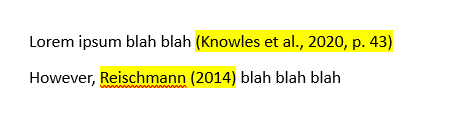
This was pretty simple. I created two regular expressions that captured these quickly.
After this was identifying references. I would want to parse the reference list first, then store them as objects in a list. I created a class to represent the Reference. They held a list of authors and the year of the reference. The actual difficulty I had was when attempting to extract them from the reference list.
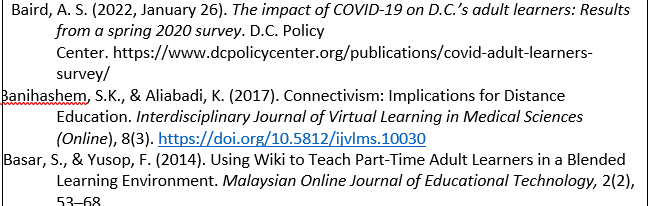
There could be one author, or there multiple. I only needed their first name (only those show up in the citations), and sometimes it was a little difficult to acertain which was which. I was trying with regex unsuccessfully for a while, until I realized that I could make my job easier by processing some of the text in python first. Not too long after, I got the regex working!
So with my referenece list prepped and regex for matching citations done, the next step was to actually process the document and match citations. After matching the citations, my final step was to highlight the relevant citation or reference. The API for python-docx is a little weird when it comes to this. Highlights are done on “runs” of text, and a run of text may be a whole paragraph or a partial segment of a word. I’m not too sure what determines a “run” in python-docx, and in the interest of time I did not bother to find out. ChatGPT could also not help me in this regard - I asked for help on some of the code for highlighting but it seems to have hallucinated.
In the end, I got a solution that highlights most of my matches. I would have to highlight the remaining ones manually. This was because of the aforementioned runs thing - some words would be cut in some runs. I could spend the extra maybe 30 minutes or so trying to fix that probelm, but I chose not to because there weren’t many that fell off the cracks.
Overall, this script took me about 3 hours to complete including my breaks and distractions. The script worked quite well and it was even able to catch a sneaky spelling mistake in a citation, which impressed my mum. I saved a good deal of time doing this, as there would be even more chapters to do in the future. It’s pretty cool how applicable programming is, especially with python which has such great libraries like python-docx.
As for ChatGPT, I would say it’s mildly useful. It’s not a replacement for reading documentation - I had to consult python-docx docs a good amount still. But, it’s useful for getting started. I’m curious about the performance of the “better” paid models in this regard, but I’m not paying to find out.