THE SKYHELIX HELPER
About 15 days ago, I completed my National Service. Huge milestone, whatever, blah blah. The next big thing in my life would be university. But university is hella expensive and I NEED MONEY. So I looked for a part time job.
I got really lucky and found a job near my home that’s pretty easy going. I now work at the skyhelix in Sentosa, and I’ve been loving it! I’m surrounded by really great people. But there’s something I notice at work. A possibility. A chance. An opportunity. At sweet, sweet OPTIMIZATION.
The rough workflow of my job is so:
- A group of people enter the queue of the attraction
- I scan their tickets, and note down on an excel sheet how many people are coming in
- I plan. There are 16 seats in the attraction, and only some have seatbelts that are longer than the rest. Some are shorter.
When planning for seating, I have to account for a couple of things. Firstly, plus-sized guests have to get the seats with longer seatbelts. We have to maintain the integrity of group - guests in groups typically want to sit together. Then, every 4 seats there are partitons - if possible, we place groups so that there are no partitions splitting them. Lastly, kids have to have a parent on their left or right for safety.
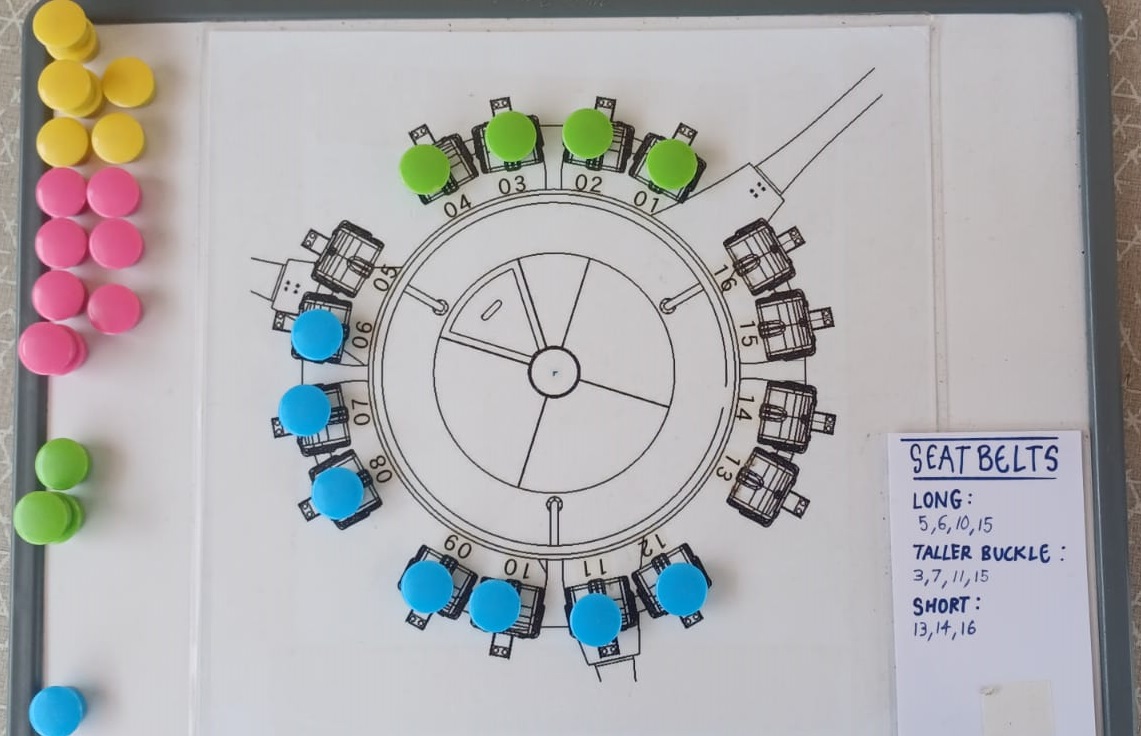
All of this combined makes it a kind of a “puzzle”. And sure, puzzles are fun to do, but when you’re managing a huge tour group, planning the next ride, and answering a question that a tourist is asking you (tourists LOOOVE to ask questions) all at the same time the fun factor is kind of gone. So recently on a shift the idea to automate this came into my mind, and I could not stop thinking about it. For the remaining of the shift I was focused on thinking about this problem and searching for solutions and algorithms.
Proof of concept
Before going all-in, I wanted to prove that I could solve this issue. So I wrote a small script. I used Javascript, because if I were to go ahead with the project, I’d want it to be a progressive web app (again), and I’d require it to work fully offline - I don’t want to send customer data to a server or do anything potentially legally implicating like that.
To solve the seating allocation issue, I used the sliding window technique with custom acceptance criteria that chooses the “best fit”. At the start though, my algo could not account for situations in which “concessions” had to be made. For example, if there was a group of 4, 3, 3, 3 people, the algo would prioritize giving gaps between the groups so that the groups would not be split between partitions. This was exactly what I coded it to do, but I realize it does not account for situations in which we HAVE to squeeze people in order to get the ride full.
So I edited the code. I added a section that “pre-processes” the queue so that I could fit the most amount of people in the ride that the groups would allow. Subtracting the amount of guests going for the ride from the total amount of seats the ride has, gives you the amount of gaps that can be left on the ride. I divide that value by the amount of groups to get the average amount of gaps that should be allocated between groups.
So what I have in the end is a sliding window algo that is aware that it can only allocate a certain number of gaps between groups - it maximizes the gaps between the groups while staying below the average amount that should be allocated.
Buuut this doesn’t work. Because it stays below the average gap that should be allocated, the longer-seatbelt seats possibly are not allocated to the group that needs them the most. The algo picks the best fit sequentially, thus resulting in non-optimal solutions. So in the end I resorted to a brute-force technique that still utilized the sliding window. It recursively fills in the seats of the ride for every possible permutation of the groups. The score is calculated on-the-fly in the “sliding window” portion of the algo. The best fit is then returned.
Designing it
With a working algo, I opened up Figma.
There is a worrying trend in my prototypes. I only realize this now. I always start with purple. There's something inherently wrong with me.
The first draft, as always, is disgusting.
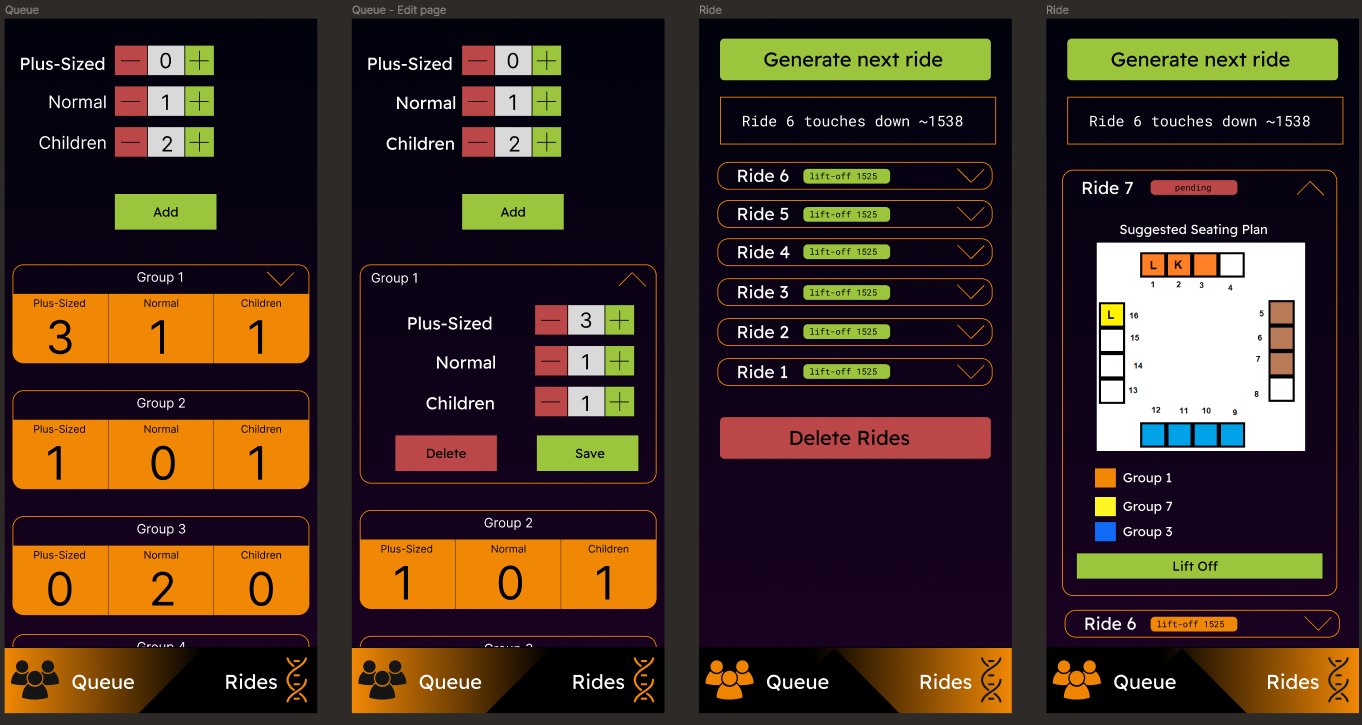
Maybe my eyes just don’t parse color as good as other people do?
I knew something was off, but I couldn’t for the life of me fix my own design. So I asked my brothers for help and they asked their friends for help too. Well, you know what they say: It takes a village to design a webpage. It’s a real quote, don’t google it.
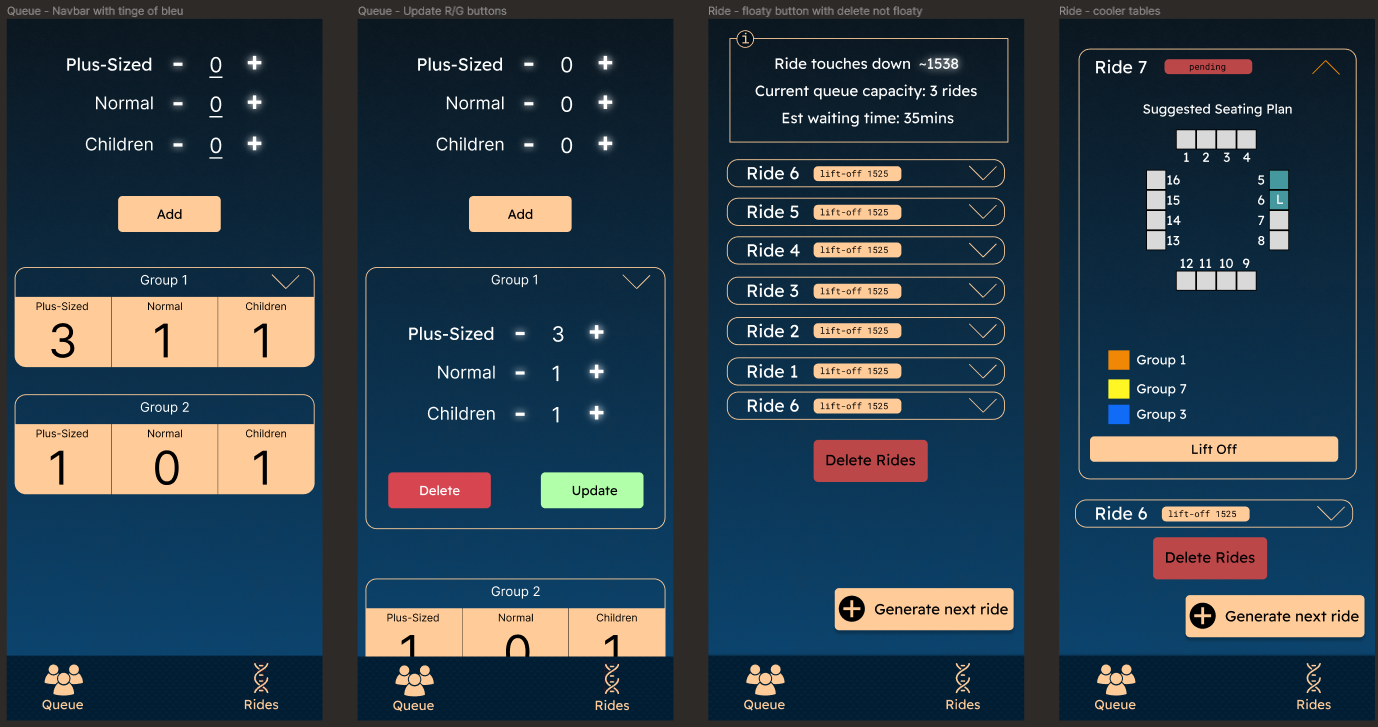
So with everyone’s help this is what the final (so far) version looks like:
Making it
Wow. For the first time, no comments. Everything went well.
Deploying it
Deploying it was mostly fuss-free. The RSS reader I made previously laid most of the groundwork to setting up a SSL’d site on my NAS. If you remember (of course you do!), my RSS reader is deployed in a docker container on a VM on my NAS in my home. Previously, simply using dnsmasq to point to the IP address of the VM was enough to get the named domain working - I bound the ports of the RSS reader container to 80 and 443. But now, I’ll be running another container on that VM, so I’ll need a proxy to send the requests to the correct port. There’s a reason I’m telling you this. So I was setting up the new domain and nginx proxy manager, and for it to work I needed to upload the SSL certs and keys that I used for the website. Now those certs and keys I generated inside the VM itself - I used the (BY DEFAULT AND THE ONE AND ONLY OPTION) SPICE protocol to get command line access to pull the code from github and generate the keys. So, I just needed to get the files out from the VM. Simple, right?
WRONG.
Why does every project have some segment that has me spiraling out of control?? Why can’t things just work??
So I mentioned I was using SPICE. So my first thought wasto get the cert and key out was to just cat the file contents and copy-paste it into a file on my PC. TrueNAS Scale’s SPICE client runs in a browser tab, and you can’t select text in it. Annoying.
A little bit of scrambling and later I decide to share the dataset in which the VM was residing on, so that I could access the files directly on my PC. I can’t. I can’t SMB share a zvol (I don’t even know what a zvol is! I tried learning but sysadmin jargon is too much for me. Sorry. Who names something a “zvol”?!?!). That sucks.
Apparently you can isci share a zvol. What the hell is isci. I feel like I’m treading water in the mariana trench when my previous experience consists solely of the kiddie pool. I try and fail anyway.
Ok back to square one - maybe a different SPICE client will allow me to copy/paste? I find one for windows and download it. The download failed the first time - pretty ominous. So I get it up and running and. You. Can’t. Copy. Paste. Why??? Why choose this over SSH truenas?? Why??
Ok hail mary. I take screenshots of the cat’d files, and save them and upload them to an online OCR tool (my patience had run thin). I try it with the OCR’d results BUT IT FAILS!!! Yayyyy.
At this point, I would’ve finished manually typing out the certificate and key if I went that route at the start. I go to sleep.
The next day, I just mounted an existing SMB share on the linux VM and copied the key and certs to the share. Bruh.
The rest of the setting up was easy, with minor hiccups. I was able to get the PWA on my phone, working!
Demo
Here’s the final product! I really like how it looks right now - it feels smooth and snappy as well. Even generating the seat allocations is very fast. Now to bring it out for some field tests.